Friday, February 22, 2013


Chapter 5: Researching and Evaluation Internet Information

Focus Question: What are search engines and how do they work?
Students today, definitely in middle high school and college, have to have access to computers and the internet in order to succeed. Most research now is done online and without access to technology students have a higher chance of failing. But when students need to write a paper or start a project, how do they know where to search and what to search for?
What most students and teachers do when they need to research something or look something up on the internet, they immediately go to a search engine. A search engine is a software program that combines many different networks to retrieve information that is being researched from different databases (Maloy,p.119). The tricky and convenient thing about a lot of everyday search engines, is that they are very fast, but bring up hundreds and thousands of results which can be very accurate and scholarly or can be written by someone next door with no expertise on the topic. This makes search engines convenient but problematic.
Search engines do bring up many links on a specific topic but again, you have to be aware to what to look for in order for the website to be a scholarly or appropriate. It is important to be able to analyze and retrieve the scholarly websites for the search. (Maloy, p.199) Teachers also have access to many specialized websites.

Tech Tool: 5.2 Customizing Your Web Browser with iGoolgle
The tech tool is one of the coolest so far, I think. iGoogle is a completely customizable to the user, based on interest or what they want readily accessible every time they come to page. They can add features such as the weather, news, and links to favorite web pages and other fun features!  This can be very useful for teachers in order for them to keep their favorite and important websites along with news and other things and not have to waste time pulling up the websites, it’s all there on their customizable page.  Below is an example of a customized iGoogle page.                  

             IGoogle-pic                                                                                                            

Summary and Connection:
I found this chapter to be very helpful and insightful. I now realize how important it is to understand search engines and how they work. Also how to interpret scholarly websites in order to write a scholarly paper. Search engines have become second nature, brought on by the internet, therefore it is important for us to know how to use them appropriately!

Resources:
 Haselton, T. (2012, July 3). Google to Kill off iGoogle | TechnoBuffalo. TechnoBuffalo. Retrieved from http://www.technobuffalo.com/2012/07/03/google-to-kill-off-igoogle/

Maloy, R. W., Verock-O, R. E., Edwards, S. A., & Woolf, B. P. (2010).Transforming learning with new technologies. Allyn & Bacon.

Friday, February 8, 2013

Chapter 4: Integrating Technology and Creating Change

Focus Question: How does technology promote educational change?


Technology promotes educational change on an array of levels. First off, technology, for mostly every person, is a daily thing, whether a child is playing a game on their parent’s Smart phone, Tablet or computer, everyone is engulfed in technology. With children being fully submerged in technology from the time they are born makes for a new way children are and must learn. Since technology is everywhere around us and most children can operate technology better than most adults, should not we incorporate technology into the classroom, more than used for A.R. testing?
                With the technology today a simple PowerPoint presentation that I grew up with in high school can now be transformed into something that is more than words on a screen. Students could go up to the board and physically write on it and interact through smart boards. There are pens that can record lectures/ voices, along with recording every word that is written with the ability to plug it into your computer and transform those notes into a word document. Although it may be financially “impossible” for a school to buy a classroom set of tablets, it may be something tax payers and county/state officials may want to reconsider, because this is the generation we are in, one that students learn through this technology, because humans have made things so advanced that a paperback textbook just will not and cannot hold the interest of a fifth grader. Without a change soon within the schools, by providing students with the technology they NEED,  we will soon find a decline in school interest and a decline in passing students, because we are not providing students with the materials, technology that they need.

Tech Tool: Online Technology Integration Resources
Edutopia:                                                                                                                                                      
I found this tech tool to be very interesting and helpful. Edutopia.org is a website that provides articles and blogs about how to integrate technology within your classroom to make it a fun and interactive way for your students to learn, and also for you as a teacher. It also provides grade levels, of what will and would not work technology wise in that specific grade level. There are many interesting articles and responses to explore.


Summary and Connection:
            I found this chapter to be very interesting and rather helpful. This chapter just showed me how important it is for technology to be welcomed and used within the schools and the classroom. It also made me think about how if change doesn't happen soon, where technology is not being used to its fullest potential how it could possible hurt or future students. Our world and definitely this country is turning, if not already, a technology based world/country, and if are students are being left behind in the schools by not having access to that technology; it can really push them back when they get into real life and real job situations. I just know I do not want to be a teacher that is holding my students back in any way possible, I want them to use technology to their fullest advantage!


Resources:

Maloy, R. W., Verock-O, R. E., Edwards, S. A., & Woolf, B. P. (2010).Transforming learning with new technologies. Allyn & Bacon.
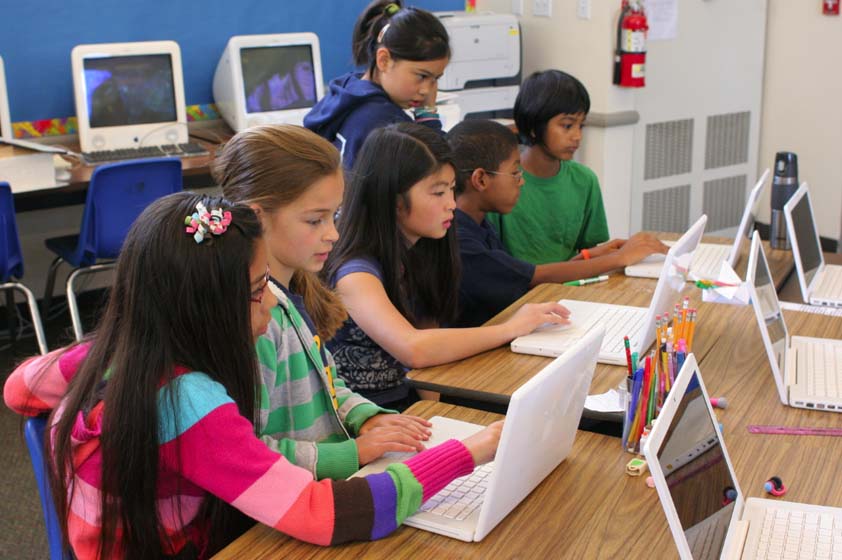
Roberge, M. (2013, January 23). Kids and Thier Computers. Salt Lake City Bookkeeping | Small Business Bookkeeper Salt Lake City. Retrieved February 7, 2013, from http://www.slcbookkeeping.com/blog/bid/112687/4-Piss-Poor-Excuses-For-Not-Succeeding-In-Business (Photo)


Friday, February 1, 2013

Chapter 3: Developing Lessons with Technology


Focus Question: What is meant by "lesson development using technology"?


Lesson development is the process in which teachers use to make/ create a lesson, the way the teacher teaches the lesson, and also the teacher’s evaluation process to make sure the student is understanding and grasping the lesson. By using various technology resources, the teacher can involve technology to help with each step of the lesson development.
                The first step of lesson developing with technology is figuring out what to teach, or the curriculum. A majority of the curriculum is provided to the teacher by different standards coming from national, state, local, and the school standards. The teachers are given the broad outlines of what must be covered in their specific grade and subjects, but they still get to choose the precise lesson and what they think needs to be taught to their students, based on the outlined standards. Technology helps teachers with this part of the development process because they can access the internet, where they can find the required curriculum, research the lesson more, and associate with other teachers getting ideas of what and how to teach the lesson.
                The second step of the lesson developing with technology is the instruction of the lesson, or how the teacher will teach the lesson. In this part of the development goals are set up in order to set what needs to be accomplished by the end of the lesson. The method of teaching then comes next, how will the lesson be taught? This is where the teacher can bring in the use of technology, the lesson can be administered through a PowerPoint, Prezi, SmartBoard, Interactive videos and games, and many other technology based programs or devices.  And finally the procedures the teacher uses in order to give them an estimated time that the lesson will take.
                The third and final step of the lesson developing using technology is the assessment portion, or the evaluation of what students have learned. The assessment is important to make sure students have learned and understand what has previously been taught to them. Assessments can be given before, during, or after the lesson, to evaluate what they know before starting the lesson, what they are learning during, and what they have mastered and know after the lesson. These assessments do not have to be administered through the expected multiple choice test, with the technology we have today, we can evaluate a student’s understanding by online testing, “digital portfolios, personal response systems, online surveys,” also through web based research projects. Technology provides students with mass amounts of information on any topic, in which they can research and learn more about through interactive games, etc. 

Tech Tool Links: Online Resources for Lesson Planning: Thinkfinity, PBS Teachers, and Gliffy
         
              I really enjoyed this tech tool, particularly the Thinkfinity website. On this website you can find lesson plans, lesson ideas, you can ask for opinions and help from other teachers, and also find links to fun and interactive websites.                                                                                             
                                   
This photo is from http://americanhistory.si.edu/presidency/home.html  , on Thinkfinity I researched how to teach the american presidents, and the link it provided me with, provided above, took me to a very fun and interactive website, which students can learn explore the lives of the presidents  and play games to learn more about the presidents. I would definitely use Thinkfinity when making up lesson plans.

Summary and Connection: 
          
           This chapter really opened my eyes on how much a techer has to consider and prepare for just one lesson. How much thought is put into a lesson is incredible, and something I never appreciated from my own teachers when I was younger, now I know how much they put into their lesson plans in order to keep us intrigued and inersted, while also learning new things. I can not wait to make fun and interactive lessons for my students, while using technology in order for them to connect more with the lesson. 


Resources:

Maloy, R. W., Verock-O, R. E., Edwards, S. A., & Woolf, B. P. (2010).Transforming learning with new technologies. Allyn & Bacon.

Smithsonian American History. (2013) Objects from the Presidency. Retrieved from: http://americanhistory.si.edu/presidency/home.html.


Sunday, January 27, 2013

Chapter 2: Transforming Learning with Unique,   Powerful Technology

Focus Question: How do students use technology for learning visually?


Unlike when I was growing up, when the visual learning came (mostly) from a two-dimensional photo in a book or on a sheet of paper, it is easy to say that practically every classroom holds at least one computer if not enough computers for each student, which provides a visual tool for learning. Not only may a classroom have computers but they may also have SmartBoards, Video projectors, microscopes and many other visually appealing devices. 
With these technologies students can now see things from different perspectives rather than just one perspective in a book photo or graph. On computers, laptops and tablets students can be put into the middle of a situation, environment or simulation; this involves the students directly, and gives students the sense of being there. We live in a three-dimensional world and can’t be expected to learn and be interested and intrigued by two-dimensional lessons. (Maloy, pg. 40)  
Technology provides a new way for visual learners to grasp and learn in a better and more understanding environment. “Visual learners are those who learn things best through seeing them. Often, visual learners will find that information "clicks" when it is explained with the aid of a chart or picture.” (Fleming)  By using technology in order to teach a visual learner, you are allowing that student to explore graphs, diagrams, photos, etc., in new and multi-dimensional way. With these new ways for these students to explore and learn, it provides for exciting lessons and the students actually wanting to learn and remember the information. When a student can make a connection and show an interest in the lesson, imakes for a lesson that they will not forget right when they leave the classroom.  
                                                                                                                                                                        Tech Tool Links: Web Resources for Visual Learners


section of the Earth’s crust        
This tech tool has to be one of my favorites so far in the textbook. The websites that it provided were very helpful and can be used for many different classrooms and grade levels. The websites provide for fun and interactive lessons and provide that chance for a visual learner to actually understand what is being taught. My favorite website was http://visual.merriam-webster.com, where the above diagram is from. I really enjoyed looking through this website because it provided bright colored, detailed diagrams and even audio visuals in some subject areas. I think rather than looking in a regular book dictionary for a definition, this website provides not only the definition in words but also through a visually appealing photo or diagram allowing the students to learn by seeing not reading. 
                                                                                                                                                 Summary and Connection:
 This chapter really made me realize how much I wish I could have had the technologies teachers and students have now. I think I would have been more interested in school and learning. This chapter made me realize how important technology is for a student in today society. Students in this generation do not go home and want to pick up a book and look at the pictures, they want to grab an Ipad or laptop and play multi-dimensional games. I now realize how important it is to bring that into the classroom in order for the student to get into learning, and remembering the lesson. 
As a teacher I plan on using technology not only for my advantage but also for the students. Technology has the power to make students learn things in different ways, and for teachers to use that tool to make an impact on their students lives. 

Resources:
Fleming, G. F. (2011, 3 12). Visual learning Retrieved from                                                                                                        http://homeworktips.about.com/od/homeworkhelp/a/visual.htm

Maloy, R. W., Verock-O, R. E., Edwards, S. A., & Woolf, B. P. (2010).Transforming learning with new technologies. Allyn & Bacon. 

Merriam- Webster (2013) Section of the Earth's Crust. Retrieved from http://visual.merriam-webster.com/earth/geology/section-earths-crust.php#mountain-range9212

Friday, January 18, 2013

Chapter 1: Becoming an e- Teacher

 Focus Question: How do new technologies create new opportunities for teaching and     learning?

             Today’s generation of children are born into a world of technology. They can’t recall a time when they actually played outside from the time they woke up until the dinner bell was rung. They don’t remember computers that were the heavy square boxes, and internet that  you had to wait for dial up to connect to. They are born where the Television they watch is as thick as our textbook and the computers and tablets can easily fit in a backpack or purse and responds to a simple touch or swipe of their finger.
 
             With these new technologies it takes adults days or weeks to figure out a new program or device, children have mastered them in a matter of 5 minutes, and are absolutely consumed by it. With children being able to learn these programs and devices so quickly and being so interested in them, shouldn't we incorporate what interests them in our classrooms? I think so. 

            “Technology is... a powerful way to motivate and engage students.”(Maloy, p.9) Technology can be used in fun and creative ways for both the teacher and the students.  “Two- thirds of high school students report feeling bored in … classes every day.” ( Maloy, p.10) By using SmartBoards, computers and tablets, students would stay intrigued and interested in the lessons. With these technologies students and teachers are forced to be interactive with one another. Letting a third grader learn multiplication tables using a computer or and Ipad, would keep them interested and wanting to keep learning. This makes learning fun for the students, which in return allows the teacher to have fun as well. When a student is excited about learning it makes the teacher more excited to teach and vice versa.   

             Also, technology can make for a more comfortable feeling classroom. When a teacher  knows the technology and can relate to students on that level, it gives students the feeling of comfort and relate ability. This will also lead to more interaction between the students and teachers. Which to me is one of the most important concepts of being a teacher, being able to relate and connect with students on many levels.

Tech Tool Link: Ultraportable Laptop Computers


     This Tech Tool made some really great points that are valid for both teachers and students. With as much work we do in a day, writing papers, researching, making lesson plans, listening and taking notes for lectures, it is a smart idea to have a portable laptop or tablet. With an Ultrportable Laptop we would be able to do all of those previously listed things whee ever we are. 


Summary and Connection:
         Although this chapter had quite a bit of information, I found it to be very interesting and eye opening. Most of the statistics in this chapter really threw me for a loop, and some of them made me sad. No child should go to school thinking "I hate school, it is so boring." Technology is out there for everyone to use, so why not use it in the classroom when we know students will love using it, and will stay connected and interested? 

         Before reading this chapter, I was somewhat on the fence of allowing a bunch of technology into schools, because it could be a distraction, but after reading this chapter I've realized it's not a distraction if used properly, and really gets the students involved and interested, and also gets the teacher to interact more with the students. I cannot wait to start teaching and interacting with my students on a totally different level than I ever experienced while in school. 


Resources:

Bright, P., (2012) The not very tabletly Windows 8 tablets of IFA. Arstechnica.com (Blog, Photo)

Maloy, R. W., Verock-O, R. E., Edwards, S. A., & Woolf, B. P. (2010).Transforming learning with new technologies. Allyn & Bacon.